School software your principal will actually open.
Sranvi is a complete school ERP that runs the school day on one tap. Live timetable with per-date overrides, attendance, staff & leave, fees, exams, hall tickets, bonafide certificates, transport, student diary, announcements — every document previews in-app before print, a persistent side rail for staff, and a read-only landing for students and parents. Mobile-first for teachers, a tidy admin web for the office, set up in a day.
No add-on modules. No "premium tier" for the basics. Every feature below is in the demo, on every plan, on day one.
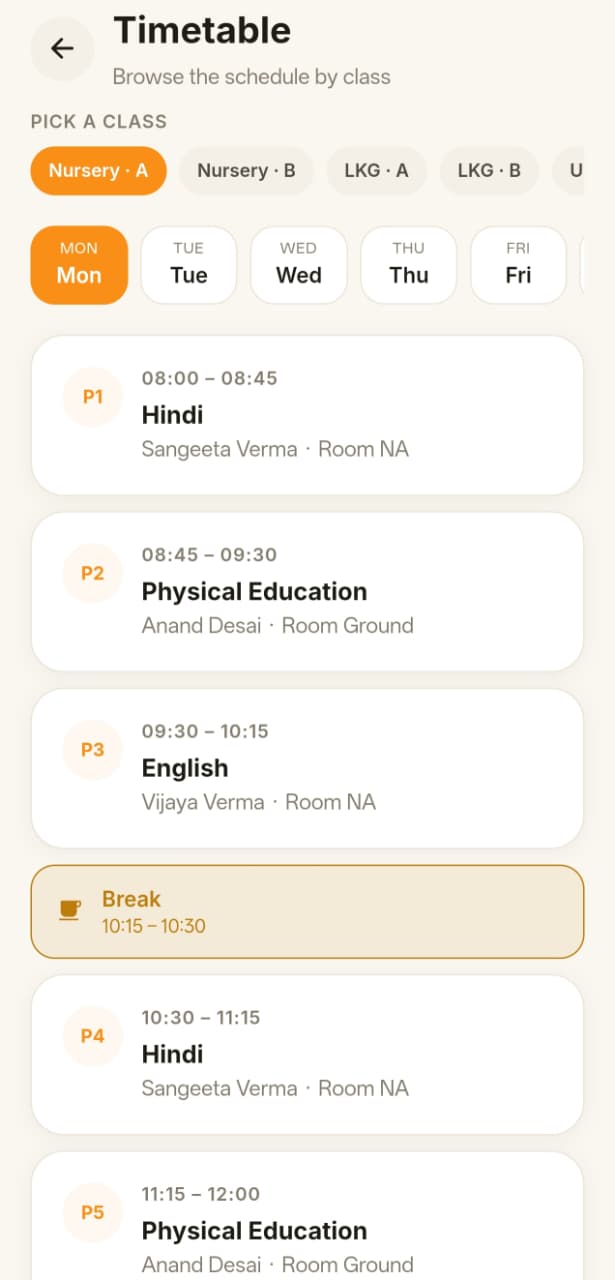
Live timetable, with overrides
Five sub-tabs: Live, Classes & Hours, Assign, Print, Settings. The current period lights up with a NOW tag — refresh-free. Override any single date inline; teacher double-booking is blocked at save. A4 landscape PDFs print class, teacher, or all-classes views with default/override notation.
Attendance, in seconds
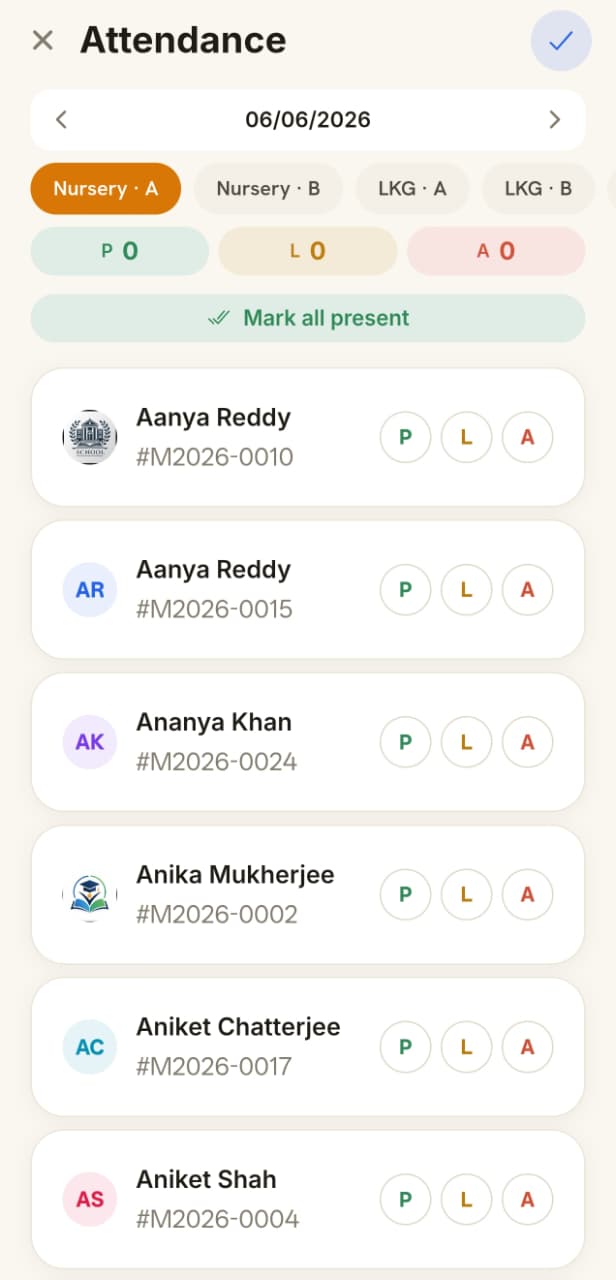
Take a class in under 3 seconds. Section view, bulk mark, ledger with month + range view. Parents see absences the same day.
Admin dashboard, day one
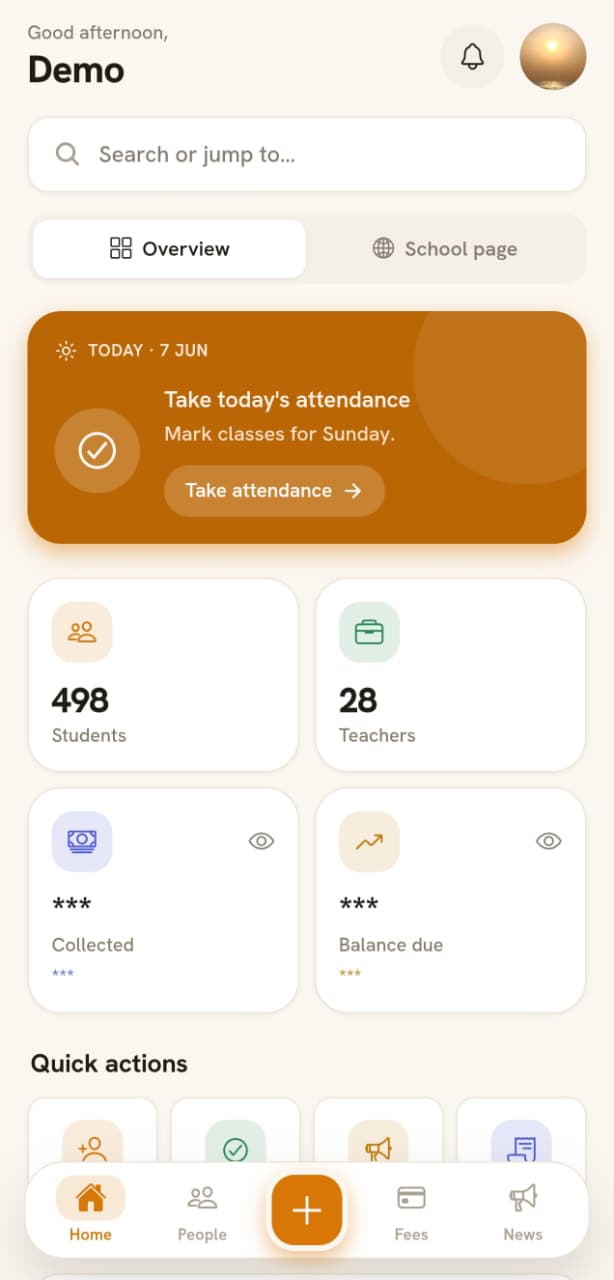
5-card KPI strip, exam bar chart, holidays row, 12 quick actions, real-time class + section + range filters per card. Open the app and see what changed today — no separate reports tab needed.
Staff attendance + self check-in
Geofenced self clock-in/out with optional selfie, or admin punches the register. A Keka-style multi-segment bar shows every in/out cycle and real active hours. Whole-day, first-half/second-half, or per-period modes — pick what the school runs.
Non-teaching staff, modeled in
A dedicated staff role for office, lab, transport and support staff — designation, joining date, photo, contact. Staff get a minimal login: their profile, self attendance, and leave. Admins (or teachers you grant) manage the roster.
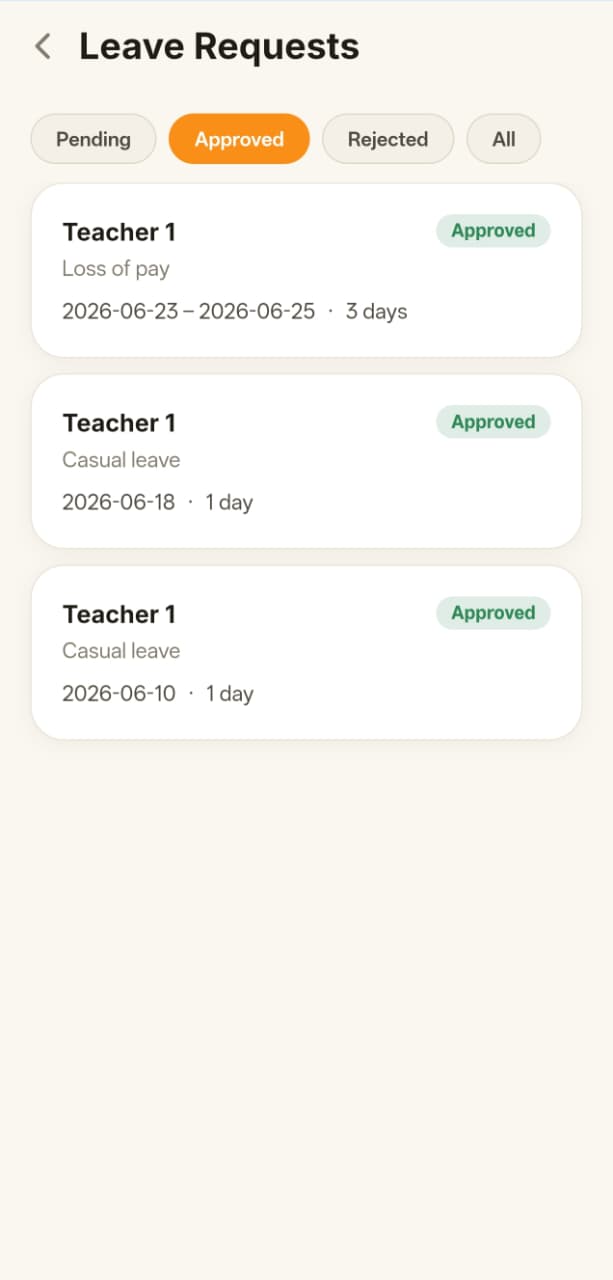
Leave management, end to end
Leave types with monthly/yearly accrual and carry-forward, per-teacher balances, half-day support, and an apply → approve/reject flow with push both ways. Admin balance adjustments and a loss-of-pay type built in.
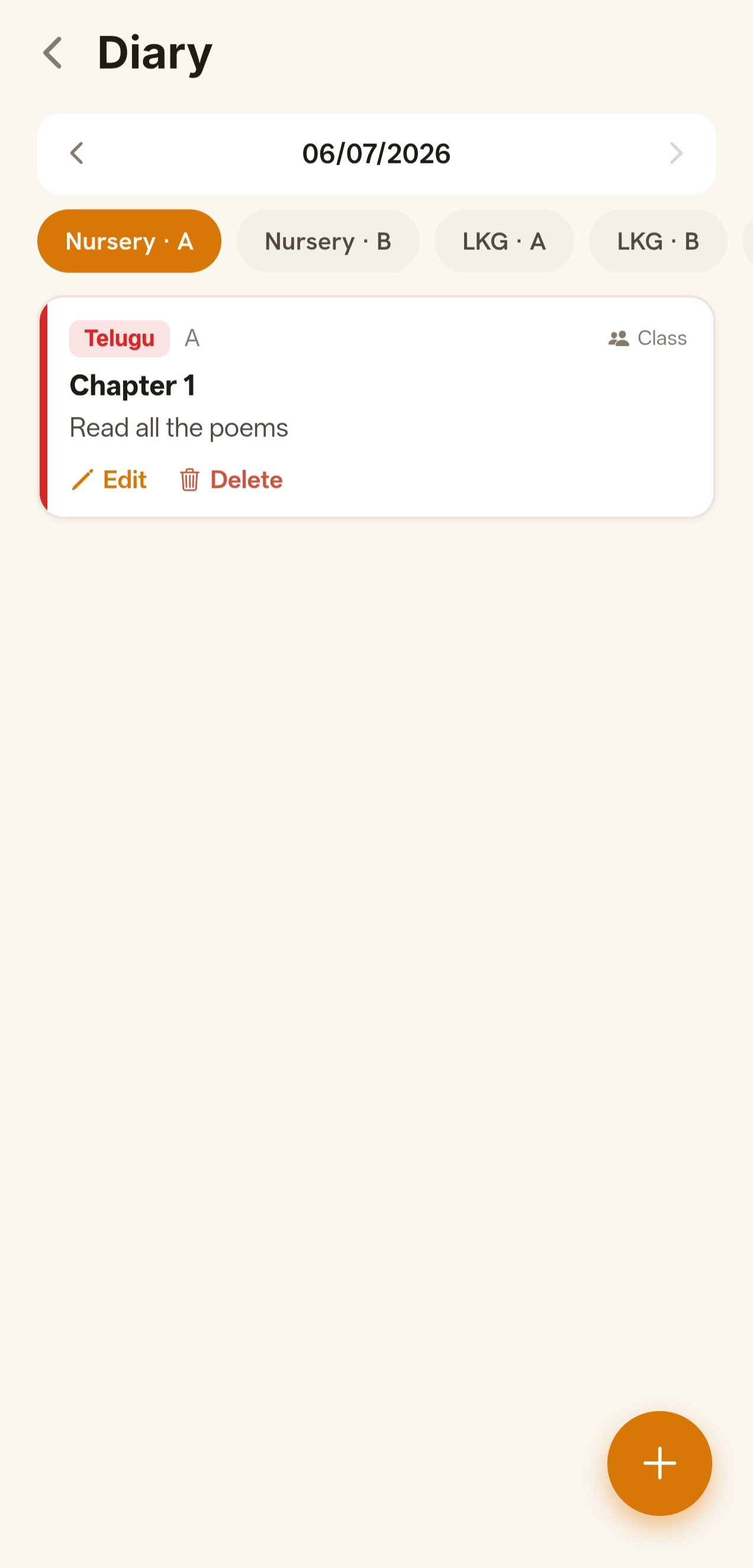
Student diary + homework
Teachers post per-subject homework and notes to a class or specific students; the family sees a clean daily feed grouped by subject with due dates. Teachers only pick — and only see — their assigned subjects.
Expenses + vouchers
Record school spending against categories, attach a voucher, and reconcile against collections in the dashboard. Admin-only money surfaces stay hidden from teachers by permission.
A public school website, built in
Every tenant gets a public home page — hero slides, features, highlights, events with photos, contact — editable from the app. Change the school name, brand colour, and identity that flows onto every printed document.
Fees + receipts that look real
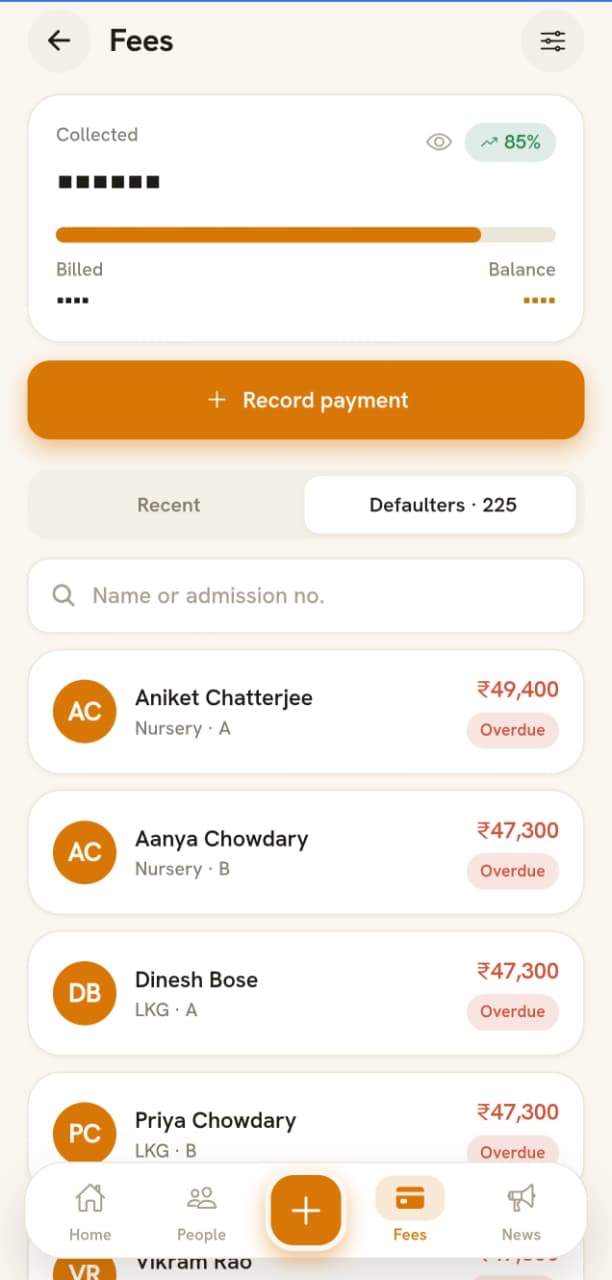
Term-wise fees, partial pay, late-fee phases, branded PDF receipts and statements. Every receipt previews in-app before download or print — catch identity mistakes before paper.
Exams + gradebook
Schedule exams, lock subject sets per class, enter marks online, auto-grade, publish. By-student form or section grid — pick what fits. Hall tickets and result PDFs ready to print.
Hall tickets + bonafide + certificates
Photo on top-left, school header, programmatic A4 layout. Every doc previews in an in-app modal before print. Drop a letterhead image and the renderer floats the fields on top. Zero Word templates.
Persistent side rail
Group-by-section navigation that stays put across every screen — Management, Communication, System, Help. Unique icon per entry; detail pages keep it sticky; teachers only see entries their permission row allows.
Student landing dashboard
Sign in as a student and land on a read-only dashboard — attendance ring, academic score, fees status, route, today's classes with the live NOW highlight, upcoming exams, latest announcements, recent receipts. No "Pay Now" button by design.
Classes + sections, modeled right
Parent class with sections (10 → 10-A, 10-B, 10-C). Inherit subjects, override per section. Teachers see only their pickers.
Bus routes
Routes, stops, vehicles, drivers. Assign students to a route and stop. Drivers get a tap-list for the morning.
Announcements + push
Target by class, section, or whole school. Web post + mobile push delivered in one tap. Holidays and badges built in.
Photos, organized
Class galleries, student profile pictures, event albums. Upload from phone, view on web. Compressed and CDN-cached.
Alumni promote
End of year, promote a class to the next year — or graduate them out. One action, fully reversible. Alumni get a quiet directory.
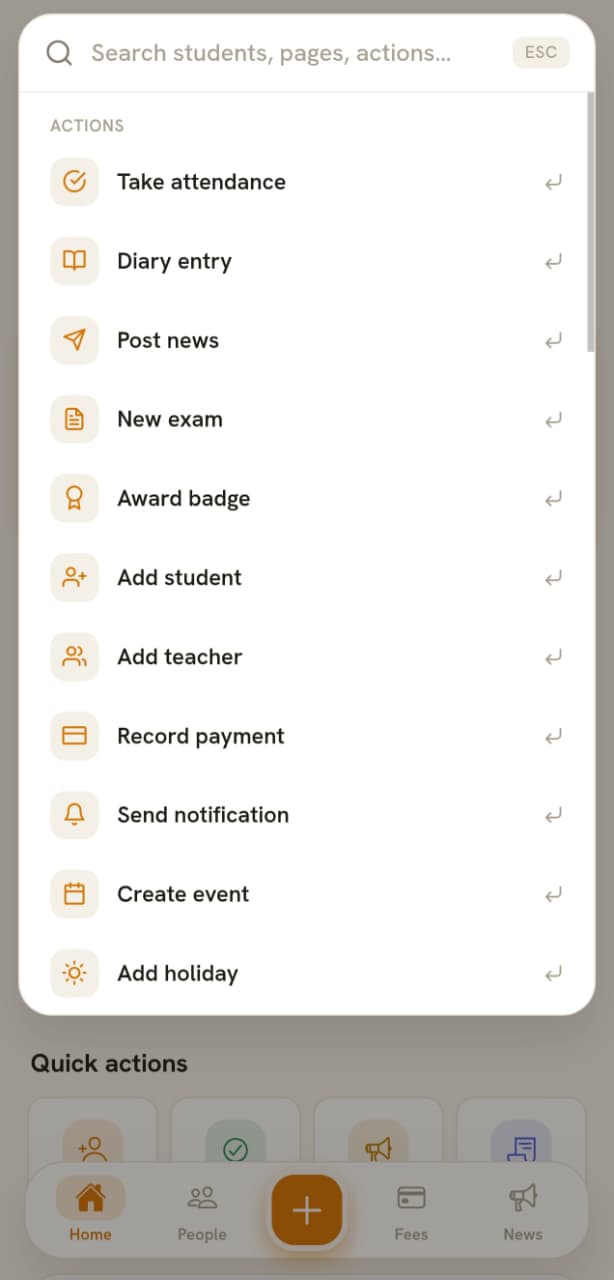
Search everything
One global search across students, parents, teachers, classes, fees, receipts, exams, announcements. Bigram fuzzy match, exact-name collapse, phone-number lookup, quick-action commands (Add student, Mark attendance…). Ctrl+K-driven on web.
Phone-based password recovery
Forgot your password? Sranvi sends a Firebase OTP to your verified phone — no "go ask the admin" detour, no email forwarding chains. Phone is verification-only — username + password still drives sign-in.
Two-factor for admins
TOTP for admins, login alerts, session controls. Indian-school-grade compliance without enterprise pricing.
Web + mobile parity
Every feature ships on both surfaces in the same week. Teachers on Android, admins on the laptop, both seeing the same truth.
Live · seeded with sample students, fees, exams
Click around. No sales call.
A real Sranvi tenant — mark attendance, post fees, generate a hall ticket, send an announcement. Reset every night so the next visitor gets a clean slate.
Every action a teacher takes during the school day — attendance, marks entry, photos, announcements, fee receipts — is built mobile-first. Designed for the entry-level Android in their pocket, not a flagship demo phone.
Designed for low-end Android
Tested on entry-level devices teachers actually carry, not flagship demo phones.
Fees due, exam published, holiday declared — delivered in seconds.
Drag-drop hall tickets, on web
Programmatic A4 layout, photo top-left, school logo, signature line.
Attendance saved · 32/32
Fee receipt · ₹12,400
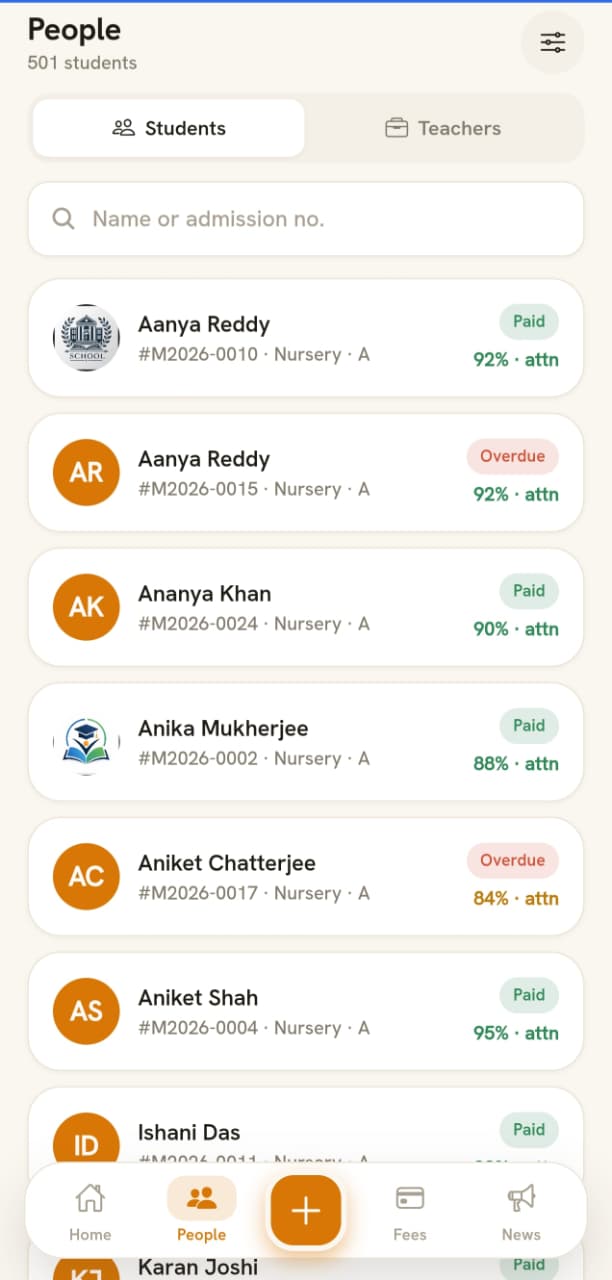
Real screenshots from the Play Store build. Cycling: dashboard → people → attendance → fees → timetable → diary → leave → search.
On the laptop
And on the admin web — every detail your office wanted.
Bulk-import grids, fee ledgers, marks-entry sheets, certificate generators. Built for the part of the school day teachers don't see — but the office lives in.
demo.sranvi.com
Live timetable with the NOW highlight
Every class, every period, today's date — at a glance. The in-progress column is brand-tinted with a NOW tag and ticks every minute. Per-date overrides edit inline; teacher double-booking is blocked at save.
demo.sranvi.com
Admin dashboard, day one
Five-card KPI strip, exam bar chart, holidays row, 12 quick actions. Per-card class + section + range filters so you don't have to wade through a Reports tab.
demo.sranvi.com
Bulk-edit grid for 800+ students
Per-section colours, route + phone in the row, click any name → full detail page. Filter slides in from the right.
Most school software vendors ship you a CD and a 6-week implementation plan. We ship a subdomain.
01
School onboards
Pick a subdomain (e.g. greenwood.sranvi.com), upload the school logo, set academic year. We provision the tenant in under a minute.
02
Admin imports students
Drop the existing Excel — students, parents, classes, sections. Bulk validate, fix the rows that complain, save. The teacher login is ready before you finish your tea.
03
Teachers take attendance · day one
They install the APK, scan the school ID, log in, mark first period. No training. The principal sees absent students on her dashboard instantly.
Pricing
Simple, honest pricing.
One-time setup fee covers onboarding & data migration. Then a flat yearly subscription — every feature included, no add-ons, no per-teacher charges.
Students
Up to 250
One-time setup
₹10,000
Yearly subscription
₹15k/year
Students
Up to 500
One-time setup
₹10,000
Yearly subscription
₹25k/year
Popular
Students
Up to 750
One-time setup
₹15,000
Yearly subscription
₹40k/year
Students
Up to 1,000
One-time setup
₹20,000
Yearly subscription
₹60k/year
1,000+ students
Custom pricing
Larger schools, multi-campus networks, or government institutions — let's talk.
On Cloudflare's edge network. Each school gets its own logical tenant, isolated by subdomain — your students never appear in another school's queries. Backups are encrypted and stored in object storage with versioning.
What happens on a slow village internet connection?
Attendance is the most important thing teachers do, so it's offline-tolerant. Marks entry, fee posting, and announcement composition all save drafts locally and retry on resume. Pages are aggressively cached.
Do parents get an app or login?
Yes. Parents see attendance, fee dues, receipts, exam results, and announcements on the same mobile app. They can't edit anything — admin-only writes. Read-only by design.
What does a student see when they sign in?
A read-only landing dashboard — attendance ring with overall %, academic score with class rank, fees status (no "Pay Now" button), route info, upcoming exams, latest announcements, recent receipt previews. The whole surface is locked to view-only; payments and profile edits flow through the admin.
Can we put our school letterhead on receipts and hall tickets?
Yes. Upload your letterhead PNG under School Identity → Printable Header Image, and the receipt + hall ticket renderer drops it in place of the assembled logo+name block. Or skip the image and the renderer composes a clean centered header from your school name + logo. Bonafide certificates use a text-only header so the body lines stay legible.
Does the teacher rail honour individual permissions?
Yes. The persistent side rail fetches the teacher's permission row on sign-in and hides entries they don't have access to — Dashboard (can_view_dashboard), Fees + Receipts (can_manage_fees), Certificates (can_manage_certificates), and so on. Admins see everything.
Can we bulk-import from our existing system?
If your existing system can export to Excel, you can import it into Sranvi. Students, parents, classes, sections, fees, even legacy attendance ledgers. We can also help you the first time.
Multi-campus or branch support?
Each campus runs as its own tenant on its own subdomain. A group office can manage them centrally — we have a super-admin app for that. Cross-campus reports are on the early-access roadmap.
Is there a Play Store app?
Yes — Sranvi is on Play Store Internal Testing right now. Public release once the developer account closed-testing requirement is satisfied. In the meantime, schools install the APK directly — link in the hero.
What does "Sranvi" mean?
It's a family name — chosen the same week our daughter was born. Sranvi is both the company and the product.
How do I get support?
WhatsApp +91 79814 56400, email rajuchofficial@gmail.com, and a shared channel for early-access schools. Same-day replies on weekdays, direct line to the founder for anything urgent. No tier-1 ticket queue.